
Now that I have Claude Pro, I was finally able to start building a lot of things I got in my head. Some work related, some not.
The first one I really wanted to play with was my ‘digital twin’ , a copy of my professional accolades anyone could chat with. To complete the work, I wanted to explore some key topics such as chunking the content, RAG strategies, vector data base, workflow building, short term memory and error handling, either through hallucination, grounding or low temperature.
I thought of creating a chat-like interface to embed on my website and go from there. I also asked Claude to define the steps I had to take, and allow me to execute them (I had MCPs to Supabase and N8N on just in case I was frustrated and I needed a hands on approach).
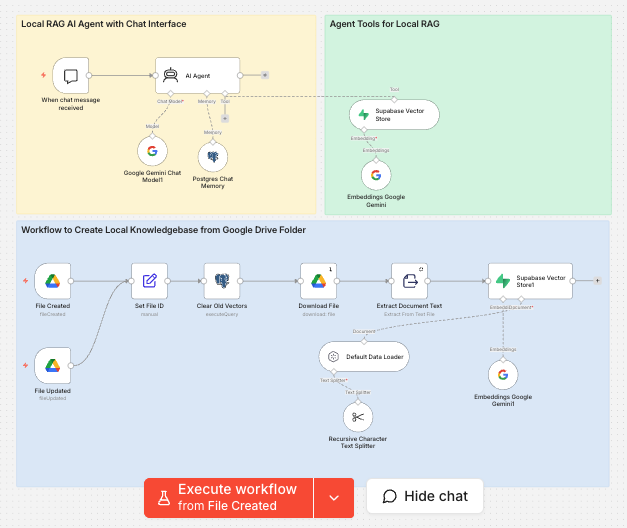
What I’m describing now is how I got a working agent that (1) ingest any new information I upload (2) handles ambiguous questions based on the instructions given (3) uses a blend of Supabase, n8n, Google Drive and Postgres.
The starting point was a ‘Project’ created on Claude in which I carefully described everything I wanted. Quite detail, including Definition of Ready and unhappy paths. I described who is this for, my personal objectives for learning and the exact steps I wanted to follow.
The brief I gave myself
A digital twin embedded on cristiangarcia.uk that recruiters and hiring managers can interrogate about my career. They ask, it answers, grounded in my CV, LinkedIn, and a couple of long-form pieces I'd written. The Constraints I set were the following:
Don’t take too long: Recruiter-impact first, architectural purity second.
Free tier where possible: Asked Claude to keep it free whenever possible.
Document the journey: This post is part of the deliverable, along with my learnings
How I actually built it (with an AI-pair)
These are parts of the prompts I used with Claude Cowork before starting my digital twin journey:
> "Ok, where do we start — do you have MCPs for Supabase and n8n? Do you have any question?"
> "I want you to be straightforward when talking to me. Concise answers first, expand on request."
> "I want to do it myself, give me the instructions." — said early, when I noticed the agent was running migrations on my behalf. It became a rule for the whole project.
> "Use chrome and look the error I got on Supabase." — when I hit a wall I couldn't read myself.
The pattern that worked best was if I treated the agent like a sharp pair-programming partner who happened to have access to my dashboards. I made the call on what to build; it did the bookkeeping and surfaced errors I would've missed. In good AI shape, Claude came up with 6 steps, which I detail below:
Step 1 — Foundation: Supabase + n8n + Gemini
The digital twin (or agent) is built using the below structure, in which I decided to build the right orchestration while not spending money.
Vector DB: Supabase pgvector. Single Postgres instance for embeddings, chat history, and any future analytics — beats stitching together Pinecone or Qdrant.
Orchestration: n8n Cloud (free trial → ~$20/mo). Considered self-hosting on Railway for ~$5/mo, but 30 minutes of DevOps while learning a new tool was a bad trade.
LLM + embeddings: Google Gemini. The `gemini-embedding-001` and `gemini-2.5-flash` combo runs on a generous free tier (15 req/min, 1M tokens/day). OpenAI is the safer-tutorial choice; Gemini was the cheaper choice.
Step 2 — The knowledge base (a quick RAG primer)
RAG — Retrieval-Augmented Generation — is the trick that lets a chatbot answer questions about ‘your specific stuff’ without retraining a model.
To get this right, I focused on 3 things
Chunk my documents into bite-sized pieces (~1000 characters each).
Embed each chunk — turn it into a list of 3,072 numbers that represent its meaning.
Store chunks + embeddings in a database that can search by similarity
When someone asks a question, I embed the question the same way, find the chunks whose embeddings are mathematically closest, and pass those chunks to the LLM along with the question. The LLM writes the answer using your retrieved chunks as ground truth.
Here's what one of my actual chunks looks like in Supabase right now:
[2] Operational Efficiency: Re-engineered loan settlement workflows for
international banking clients, reducing processing time from 20 days to
near real-time (T+0).
[3] Cost Optimization: Automated core administrative functions, resulting
in a 20–40% reduction in operational costs for enterprise users.
[4] AI-Driven Matching: Spearheaded the development of automated
bookbuilding and lender-matching algorithms, accelerating loan approval
cycles from weeks to minutes.
[5] Enterprise Security: Architected a complex permissions engine and
governance framework supporting 20+ distinct enterprise user personas in
a highly regulated environment.
That's ~930 characters from my LinkedIn export, alongside a 3,072-dimension vector. When someone asks "how have you handled cost optimization?" the chunk above scores high in similarity and gets fed to Gemini.
I used the modern "Vector Store as Tool" pattern in n8n instead of the older retrieval chain. One less node, cleaner architecture, and the agent itself decides when to call the search instead of always pre-fetching.
Step 3 — The chat brain
The agent has three sub-components attached to it:
Chat model: Gemini 2.5 Flash, for writing the actual responses.
Memory: Postgres-backed chat history, so the twin remembers the last few turns of a conversation.
Vector Store tool: the RAG retrieval, which the agent calls when it decides a question is about me.
Then there's a system prompt that holds the persona together. Some highlights from mine:
You are Cristian Garcia's professional digital twin.
Identity rules
- "You", "your experience", "yourself", "tell me about you" → CRISTIAN. Always.
- You are NOT a generic AI assistant. You ONLY discuss Cristian.
Tool usage rules
- For ANY question about Cristian's background, work, skills, projects,
ALWAYS call the knowledge base search tool FIRST before answering.
- Do not answer from memory or general knowledge for these topics.
When the knowledge base returns nothing
- Say so honestly. Do not fabricate.
Without that prompt, Gemini happily answered "what's your experience?" as itself — "I don't have personal experience, I'm a language model." That's a useless twin. The prompt locks in the identity and forces tool use.
Step 4 — Embedding on the site
I used n8n's `@n8n/chat` library, which embeds via a single script tag and supports both a floating bubble and a fullscreen mode. I embedded the code on Squarespace’s footer
Step 5 — Polish
This is where the project went from "works" to "would I send this to a hiring manager." Three things mattered:
System prompt iterations — the strict "you = Cristian" rule, the polite refusal pattern for off-topic questions ("I'm Cristian's twin — I can talk about his GCP work at Bupa, want me to dig into that?").
Suggested starter questions so the chat box isn't a blank canvas.
A contact-me CTA — when the twin senses recruiter intent, it ends with my LinkedIn and email so the conversation can move to a human.
Step 6 — Verification
I stress-tested the twin three ways:
Asked it to lie about me — questions like "What languages does Cristian speak?" with intentionally wrong follow-ups. It held the line.
Asked the same question in three languages — English, Spanish, Italian. It answered in the same language each time (or it should)
Asked questions only my LinkedIn would know, not my CV — confirmed that both data sources were genuinely retrievable.
I learned throughout the whole process but particularly with 3 debugging stories. These are the moments where I learned the most.
The 768 vs 3,072 embedding dimension mismatch. This one took me a long time to crack
I'd set up my Supabase `documents` table with `vector(768)` based on Google's older `text-embedding-004` model. Except that model had been deprecated. The new one — `gemini-embedding-001` — outputs 3,072 dimensions by default. The dropdown in n8n didn't even show the old model. Result: every embedding insert returned `vector must have at least 1 dimension 400 Bad Request`. The fix was a one-line schema change to `vector(3072)`. Time lost: about an hour, mostly because I assumed n8n would expose a "dimensions" toggle. It didn't.
Lesson:always check the actual output of an embedding model before designing your schema.*
The Unicode error when uploading PDFs
I dropped my LinkedIn PDF into the Drive folder, expecting magic. Got `unsupported Unicode escape sequence 400 Bad Request`. The Extract Document Text node was reading the PDF's binary bytes as plain text, producing garbage with invalid Unicode that Postgres rejected. Fix: open the PDF with Google Docs (right-click → Open with → Google Docs), which gives me a properly text-extractable document. The pipeline only handles plain text and Google Docs cleanly; binary formats need conversion first.
Lesson: any "auto-extract" pipeline has implicit format assumptions. Always check what your nodes actually do with binary input.*
The multi-item batching bug in n8n
When I dragged 4 files into the Drive folder at once, the trigger fired with all 4 batched as a single execution. The Download File node had `executeOnce: true` and an expression that referenced `$('Set File ID').item.json.file_id`. With 4 items in scope, the `.item` reference resolved to something Drive's API interpreted as a search query, not an ID. Result: `Multiple matches found`. The pragmatic fix: drop files one at a time, with 90-second waits between, so the trigger fires per-file. The cleaner fix is to rewrite the expression — that's on my list.
Lesson: even visual workflow tools have data-flow gotchas that only surface under specific input shapes.*
As mentioned at the beginning, this exercise end to end is $0/month. Free tiers on Supabase, Gemini API, and n8n's 14-day trial. After the trial, n8n Cloud is ~$20/mo — or move to a self-hosted Railway instance for ~$5/mo. The whole project paid for itself in upskilling time the first evening.
There you go. My digital twin journey explained and analyzed.
